
Every website has links that stop working. Pages get deleted, blogs shut down, and URLs change. Each dead link is a small problem for the site owner, and a real chance for you. Broken link building means finding those dead links on relevant pages and offering your own page as a working replacement.
It is one of the safest ways to earn backlinks because you are helping the other person first. In this guide I show the full process with free tools only, plus an outreach email you can copy.
In this guide
What is broken link building?
Broken link building is a link building method where you find a link on someone else’s page that leads to a 404 or dead page, then tell the owner about it and suggest your content as a replacement. If your page is a good fit, they swap the dead link for yours and you get a new backlink.
It is a white hat method. You are not paying for the link or tricking anyone. You are pointing out a real problem and offering a real fix. If you are new to links, read backlinks in SEO first, and see where this method fits in my guide to white hat link building.
Why broken link building still works
- You give value first. Site owners do not want broken backlinks on their pages because they frustrate readers. Your email helps them fix that.
- The link already had a reason to exist. The owner chose to link to that topic once. If your page covers the same topic well, it is an easy decision.
- It works for small sites. You do not need a big brand. You need one good page that matches the dead resource.
- It costs nothing. Every step below can be done with free tools.
Be realistic, though. Many people will not reply. A small number of links from a batch of honest emails is a normal result, and the links you do get are usually from relevant pages, which is what matters.
Free broken link building tools
You do not need expensive software to find broken links. These free broken link building tools are enough to start:
- Google search operators. Use searches like
"your topic" + "useful resources","your topic" intitle:resourcesor"your topic" inurl:linksto find resource pages in your niche. - A browser link checker extension. Free extensions such as Check My Links for Chrome scan the page you are on and highlight dead links in red.
- Free online broken link checkers. Some SEO tools offer a free checker that lists broken outbound links for a page or a small site. Free versions have limits, but they are fine for checking one page at a time.
- The Wayback Machine (archive.org). Paste the dead URL to see what the page used to say. This tells you what kind of content the owner was linking to.
- Google Search Console. Use it on your own site. The Pages report shows your own 404 pages, and the Links report shows who links to you. My guide on how to check backlinks for free explains both reports.
I am not linking to every tool here on purpose. Free plans and features change often, so check what each one offers today before you rely on it.
Broken link building step by step
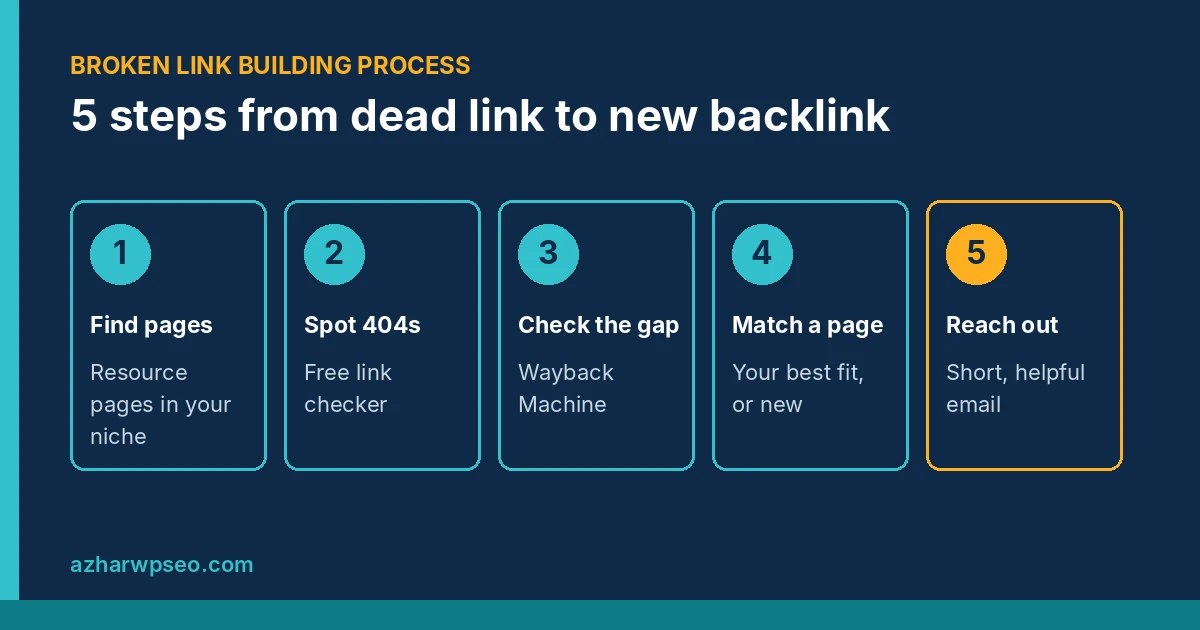
Step 1: Find relevant resource pages
Start with pages that link out a lot: resource lists, “best tools” posts, guides and link roundups in your niche. Use the search operators above and change the topic words each time. Keep a simple sheet with the page URL, the site name and the contact details.
Relevance comes first. A dead link on a page about your topic is worth far more than a dead link on a random site.
Step 2: Find broken links on those pages
Open each page and run your link checker extension. Note every dead link, the anchor text around it, and where it sits on the page. Before you trust the tool, click the link yourself. Sometimes a site is only down for a moment, or it blocks checkers.
Step 3: Check what the dead page used to say
Put the dead URL into the Wayback Machine and look at an old snapshot. Was it a checklist, a guide, a tool or a study? This step matters. If your page covers something different, the owner will not swap the link, and the email will look like spam.
Bonus: if the dead page was popular, other sites probably linked to it too. You can find more of those pages later with a backlink checker and reach out to each one.
Step 4: Match it with your best page (or create one)
Pick the page on your site that truly replaces the dead resource. If you do not have one and the topic is important, write a better version. Make sure your page is up to date, loads fast and answers the same need the old page did.
Step 5: Find the right contact
Look for an author name on the page, a contact page, or an email in the site footer or About page. Writing to the author of the post usually works better than a general inbox. Do not guess or scrape emails in bulk.
Step 6: Send a short, helpful email
Lead with the fix, not the request. Tell them exactly where the dead link is, then mention your page as one option. Keep it under 120 words. Use the template below and change it for each site.
Step 7: Follow up once and track results
If there is no reply after about a week, send one polite follow-up. After that, move on. Record the date, the reply and the live URL in your sheet. When a link goes live, open the page, right-click your link, choose Inspect and check the rel value so you know if it is a normal link or marked rel="nofollow".
Broken link building outreach email template
Subject: Quick heads up about a broken link on [page title]
Hi [Name],
I was reading your post “[page title]” and noticed that the link to [old resource name] in the [section name] section now leads to a page that no longer exists.
If you are looking for a replacement, I wrote a guide on [topic] that covers [the same points]: [your URL]. No problem at all if you prefer another source. I just wanted to let you know about the dead link.
Thanks for the helpful resource,
[Your name]
[Your website]
Why this works: it names the exact place on the page, it helps even if they do not use your link, and it is short. Google’s guidance on making links crawlable also recommends clear, descriptive anchor text, so if the owner asks how to link to you, suggest anchor text that describes your page instead of an exact-match keyword.
Broken link building mistakes to avoid
- Pitching an unrelated page. If your page does not replace the dead one, do not send the email.
- Mass emails with the same text. Automated, copy-paste outreach to hundreds of sites is spam. My guide on black hat link building explains where the line is.
- Offering payment for the link. Paying for a link that passes ranking value breaks Google’s spam policies.
- Too many follow-ups. One follow-up is enough.
- Ignoring your own site. Fix the broken links and 404 pages on your own website too. Search Console shows them for free.
Broken link building works best next to other free methods. I listed more of them in my guide to free backlinks.
FAQ
Is broken link building white hat?
Yes. You are helping a site owner fix a dead link and suggesting relevant content. It only becomes a problem when it is automated into spam or combined with paid links.
How do I find broken links on a website for free?
Use a free browser extension like Check My Links to scan one page at a time, or a free online broken link checker for a small site. For your own website, the Pages report in Google Search Console shows URLs that return 404.
How many emails should I send to get one link?
There is no fixed number. Reply rates depend on your niche, how relevant your page is and how personal the email is. Track your own results in a sheet and improve the pages and emails that do not get replies.
Are broken backlinks to my own site a problem?
If other sites link to a page on your site that now returns 404, you lose the value of those links. Redirect the old URL with a 301 to the closest matching live page, or bring the page back.
Want someone to find link opportunities for you? I will review your backlinks and on-page SEO and send you a clear list of what to fix first.