

Getting a backlink is only half the job. Links get removed, pages get deleted, and sites change a normal link to rel="nofollow" without telling you. If you never look again, you will not know which links you still have. This guide shows how to track backlinks for free with two things: a simple Google Sheet and Google Search Console.
Checking backlinks once and tracking them over time are different jobs. If you only want a one-time list, read my guide on how to check backlinks for free. This post is about the routine that comes after: logging every link, checking it every month, and noticing what is new and what is lost.
In this guide
Why track backlinks at all?
A backlink is a link from another website to yours. If you are new to the topic, start with my post on backlinks in SEO. Once you start earning links, knowing how to track backlinks helps in four ways:
- You notice lost links. A guest post can be edited, a directory can delete your profile, and a resource page can be removed. You cannot fix what you do not see.
- You know the real
relvalue. A link that was normal last month may berel="nofollow"orrel="ugc"today. - You learn what works. When every link is in one sheet, you can see which methods actually bring links for your site.
- You spot bad links early. If strange, spammy sites start linking to you, you will see them in your monthly check instead of months later.
Step 1: Set up a free backlink tracker sheet
The first part of learning how to track backlinks is having one place to record them. You do not need paid software to monitor backlinks. A free Google Sheet works well for a small or medium site. Create a new sheet and add these columns:
- Date live: the day the link went live.
- Linking page URL: the exact page where your link sits, not just the domain.
- Your target URL: the page on your site the link points to.
- Anchor text: the clickable words.
- Link type: guest post, profile, directory, resource page, broken link, mention and so on.
- rel value: what you saw when you inspected the link (none, nofollow, ugc or sponsored).
- Status: Live, Changed or Lost.
- Last checked: the date you last opened the page and confirmed the link.
Add one more column called Days since check with the formula =TODAY()-H2 (change H2 to your “Last checked” cell). Sort by this column and you instantly see which links you have not looked at for a while.
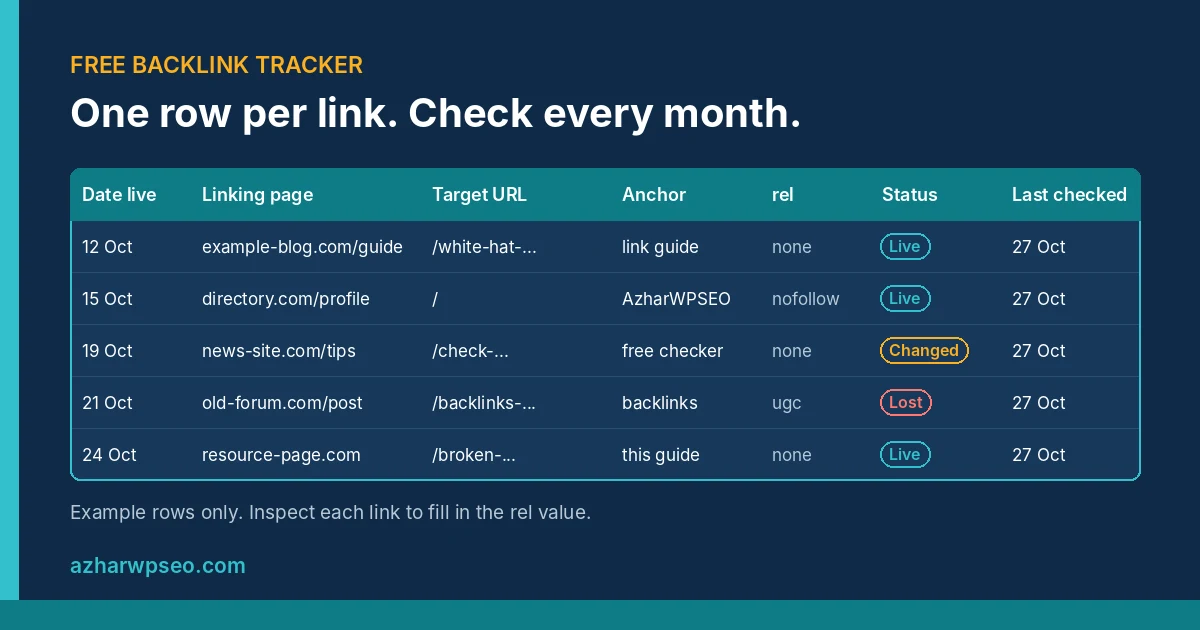
Step 2: Log every link the day it goes live
The best time to add a link to your backlink tracker is the day it goes live, while you still remember where it came from. For each new link:
- Open the linking page and find your link.
- Right-click the link, choose Inspect, and read the
relattribute in the code. If there is norel, or it does not include nofollow, ugc or sponsored, it is a normal link. - Copy the exact page URL, your target URL and the anchor text into the sheet.
- Set Status to Live and Last checked to today.
Do not log a link as a normal link just because a site says “dofollow” on its sales page. Only the code on the live page tells you the truth.
Step 3: Use Search Console to find new links
Your sheet only knows the links you built yourself. Other sites may link to you without telling you. Google Search Console fills that gap for free.
- Open Search Console and choose your property.
- Click Links in the left menu.
- Under External links, open Top linking sites to see which domains link to you, and Top linked pages to see which of your pages get the most links.
- Click Export external links at the top and choose Latest links. This export includes the date Google last crawled each linking page, so you can sort by date and look at the newest ones first.
- Compare the export with your sheet. Any linking page that is not in your sheet is a new link. Open it, inspect the
relvalue, and add it.
Keep in mind that Search Console shows a sample of your links, not every single one, and new links can take a while to appear. Google explains what the report includes in its Links report help page. If you want a second free source, Bing Webmaster Tools also has a Backlinks report once your site is verified there.
Step 4: Monthly check for lost links
Once a month, block 30 to 60 minutes and go through your sheet. This simple routine is how to track backlinks without any paid tool:
- Sort by “Days since check” and start with the oldest rows.
- Open each linking page. Is your link still there? Does it still point to the right URL?
- Inspect the
relvalue again. If it changed, update the row and set Status to Changed. - Mark missing links as Lost and note the date.
- Download a fresh “Latest links” export from Search Console and add any new linking pages.
- Write down the monthly totals: new links, lost links and live links. After a few months, you can see whether your link profile is growing or shrinking.
Use a filter view on the Status column so you can quickly see only Lost or Changed links when you plan your next steps.
What to do when you lose a backlink
Losing a link is normal. What matters is how you respond:
- The page was deleted or moved. Check if the content moved to a new URL. If it did and your link is gone, send a short, polite email asking if they can add it back.
- Your own page changed. If the link points to a URL on your site that now returns 404, set up a 301 redirect to the closest live page. Search Console’s Pages report shows your own 404 URLs.
- The link was removed on purpose. Accept it and move on. Do not send repeated emails.
- The linking site itself is dead. Look for other pages that linked to the same resource. My guide to broken link building shows how to turn dead links into new opportunities.
Do not try to replace lost links with paid or spammy links. Bought links and link schemes break Google’s spam policies, and I explain the risks in my post on black hat link building. Steady, honest methods from my white hat link building guide are slower, but the links last.
FAQ
Can I track backlinks for free?
Yes. A Google Sheet plus Google Search Console is enough for most small sites. The sheet keeps your own record, and Search Console shows links Google has found. Bing Webmaster Tools is a useful free second source.
How often should I check my backlinks?
Once a month is enough for most sites. Log new links on the day they go live, then do one full check of all rows each month.
Why are some of my backlinks missing in Search Console?
Search Console shows a sample of links, not a complete list, and it can take time for new links to appear. Keep your own sheet so you do not depend on one report.
How to track backlinks without paid tools?
Log each new link in a Google Sheet on the day it goes live, add new links from the Search Console Links report export, and open every linking page once a month to confirm the link and its rel value.
What is the difference between checking and tracking backlinks?
Checking gives you a snapshot of the links you have today. Tracking means recording them over time so you can see new links, lost links and changes in the rel value month by month.
Not sure which of your backlinks are helping? I will review your links and on-page SEO and send you a clear list of what to fix first.